
There are a few web concepts that appear in every webpage, and they are a recurring source of confusion among designers and developers. Maybe it is because their names are really similar, maybe it is because some have overlapping roles... but they are always causing trouble.
I am talking about the 4 Hs of HTML: Head, Header, Heading, and Headline. Sometimes these names are used interchangeably, but nothing could be further from the truth. Each of them is its own thing and needs to be treated and called appropriately.
It may seem trivial, but clarity is important because semantics, maintainability, and accessibility depend on it... and having a clear definition for them facilitates communication and helps people understand each other faster (and move projects forward just as quickly.)
So, what are the 4 Hs of HTML?
Head: The Document's Brain
The head of a document is the <head> element. It contains machine-readable information about the document itself (metadata) and, because it is designed for machines and not humans, it is not part of the layout and it is not visible on the browser.
A common misunderstanding happens when designers and developers talk about the head of the document to refer to the header of the page or the hero section above the fold. That's not what the head is.
Among other things, the head contains information like:
- The page title in the
<title>tag. - Links to scripts and style files.
- Meta tags with browser instructions and directions.
- Social media and SEO tags for web crawlers.
Although some of that information may be visible to the user (the title is displayed on the tab name, or a social media image is shown on posts), generally the data in the <head> is invisible to the site's visitors.
Header: Introductions and Banners
The header of a page is an introduction section usually located at the top that contains things like the title, a short description, navigation, a hero banner, or a search box. It can be represented by the <header> semantic HTML element, and it is very much visible.
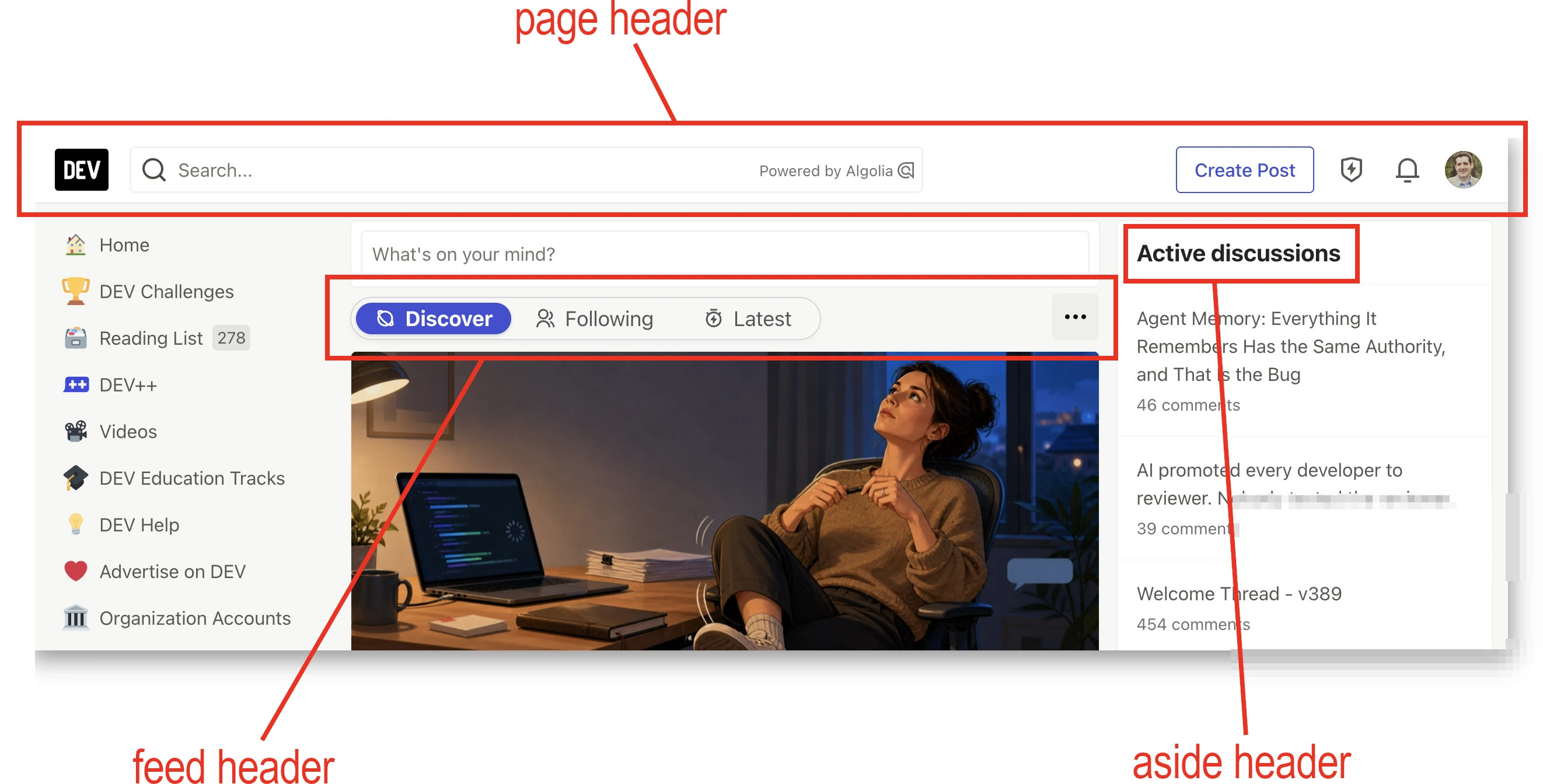
While normally every page has a "main header," there can be multiple headers on a page: an <article> may have a header, so may a <section> or the <main> content of the page, as well as an <aside>. So a single page may have several headers, or none at all.
Maybe because designers don't usually deal with the <head> code, or because "head" is a shorter way of saying "header" (and after all, it usually sits on top of the page, but not always), they often use the terms interchangeably. That can be a bit confusing for developers.
Heading: The Content Hierarchy
In essence, a heading is the title of the page or a section. The <h1>-<h6> family of HTML elements represent headings.
They are sometimes called headers, other times called headlines... and they are neither! A header may contain a heading, but doesn't have to (see the feed header in the picture above); And headlines may use a heading, but they are not defined by it, they tend to have other elements too (more about this on the next section).
We use headings to define the outline of the content, providing hierarchy both for humans (text is larger and more identifiable) and machines (labeling each section for better accessibility and SEO results.)
One important thing: use headings for structure, not for layout. Do not use a <h1>-<h6> tag to make text look bigger or bolder. By doing that, we break the hierarchy of the page and it can be really confusing for assistive technology users.
Headline: Editorial Content
Usually, the headline is the big eye-catching text that introduces the page or section... just like on a newspaper! A headline is not an HTML concept, it is an editorial one; but developers often try to interpret it as a header or even just a heading.
And that is where confusion starts: a headline is for message delivery while headers and headings are for structure and hierarchy, respectively. Yes, headlines may contain headings, but they are not defined by the headings. There's more to them: titles, subtitles, calls to action...
There isn't a direct semantic HTML equivalent to a headline. The closest thing would be the <hgroup> element, but it has gone through many semantic changes over time and would only represent a really basic version of a headline (with a heading and a paragraph)
Some designers use "headline" as shorthand for "the big text at the top," even when it's a UI component instead of editorial content. Those cases are more of a combination of a heading and multiple buttons, which in my opinion would follow more into the header category... but I'm just a developer.
Conclusion
And that's it! Those are the 4 Hs of HTML: Head, Header, Heading, and Headline, and what each of them represents.
Here's a quick summary table with all of them:
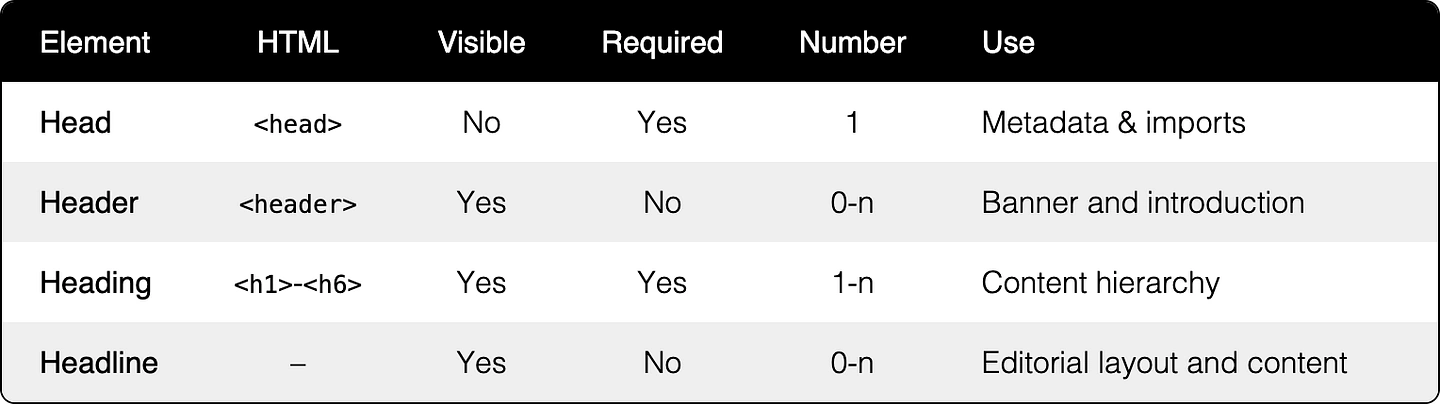
As you may have noticed, their names are really close, and their functionality, while different, intertwines. They often go together or are combined in some manner.
But it is really important to understand their differences and have clear naming conventions to avoid miscommunications (and extra work) between the design and the development teams.
How about you? Have you ever "argued" or run into miscommunications with a designer or a developer who called a head a header?